Sense Engine
Real-Time Location System
A multi-vendor RTLS platform built from scratch — data pipeline, backend, floor plan tools, and operator interface — in under six months, with no prior experience in location tracking.
Designer & Engineer
Multi-vendor API
50,000 sq ft
(Claude + Cursor)
The Problem
The hardware existed.
The data went nowhere.
The client had already deployed BLE tracking infrastructure across multiple facilities — gateways from three different vendors, sensors attached to assets, vehicles, and personnel. But none of it was usable. Each vendor spoke a different protocol, returned raw payloads in different formats, and provided no unified way to see where anything actually was.
There was no interface. No floor plan. No concept of a "zone" or an "alert" or a "device going offline." The hardware was running and the data was flowing — into a void.
The problem wasn't the data. The problem was that nothing turned the data into something a warehouse operator could act on.
I came into this with no prior RTLS experience. What I had was a strong conviction that the right interface could make a genuinely hard technical problem invisible to the people who needed to use it.
Architecture
Decoder-Profile Separation
The Build
Every layer. One person.
Sense Engine is a multi-tenant RTLS platform. I built it end to end: from raw BLE payload ingestion to the interface operators see in real time. No component was off the shelf. Every decision had to account for the next layer.
Simultaneous ingestion from Cisco Spaces, Juniper Mist, and Mako. Each vendor returns different raw payloads. The pipeline normalizes all three into a single internal device model — MAC address, signal strength, timestamp, position estimate, vendor metadata.
Five algorithms run in parallel or in fallback chains depending on the deployment environment: RSSI Least Squares, Fingerprint KNN, Hybrid Mix, Fallback, and GPS Positioned. Each method is selectable per-facility based on what produces the most accurate result for that floor plan.
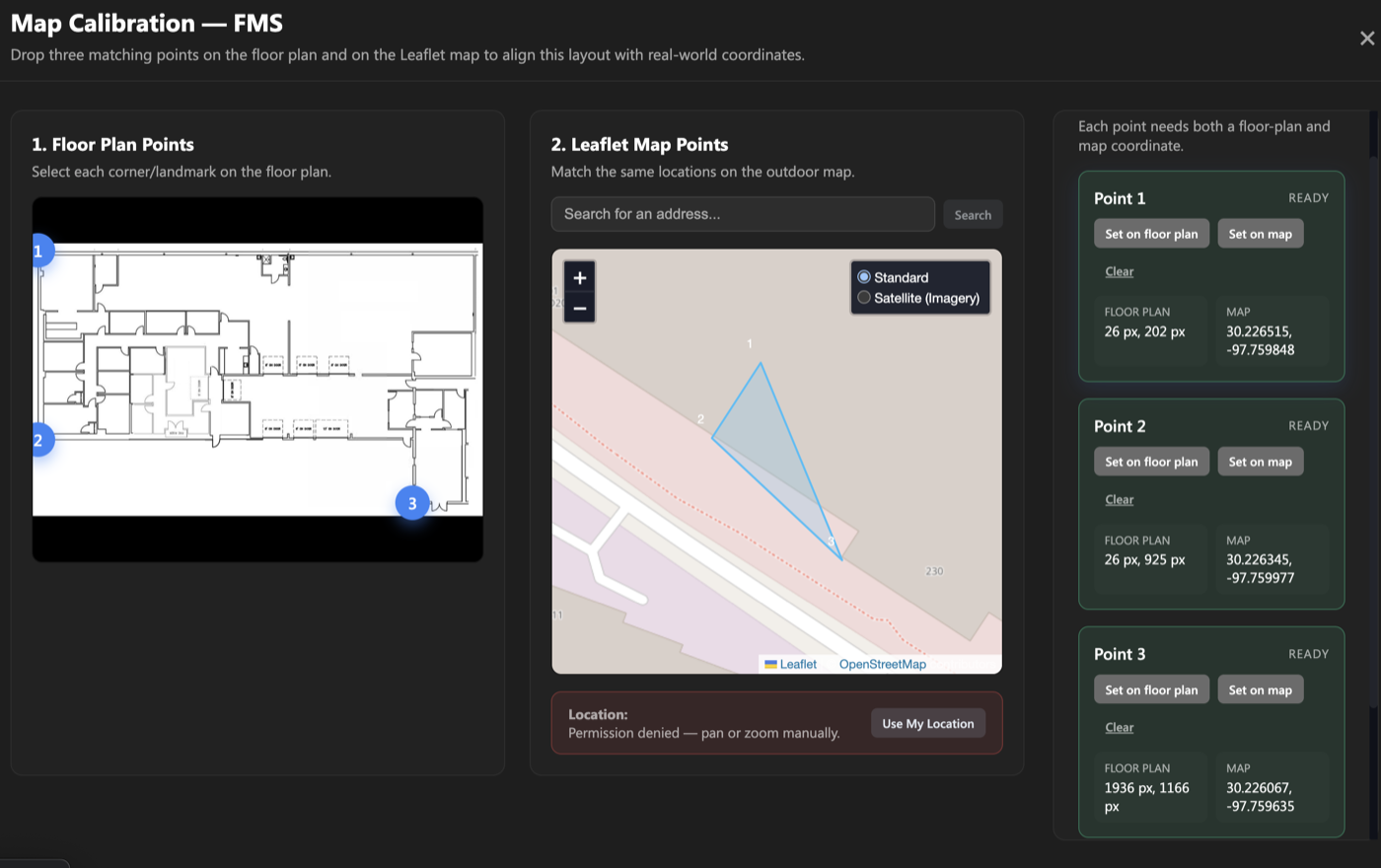
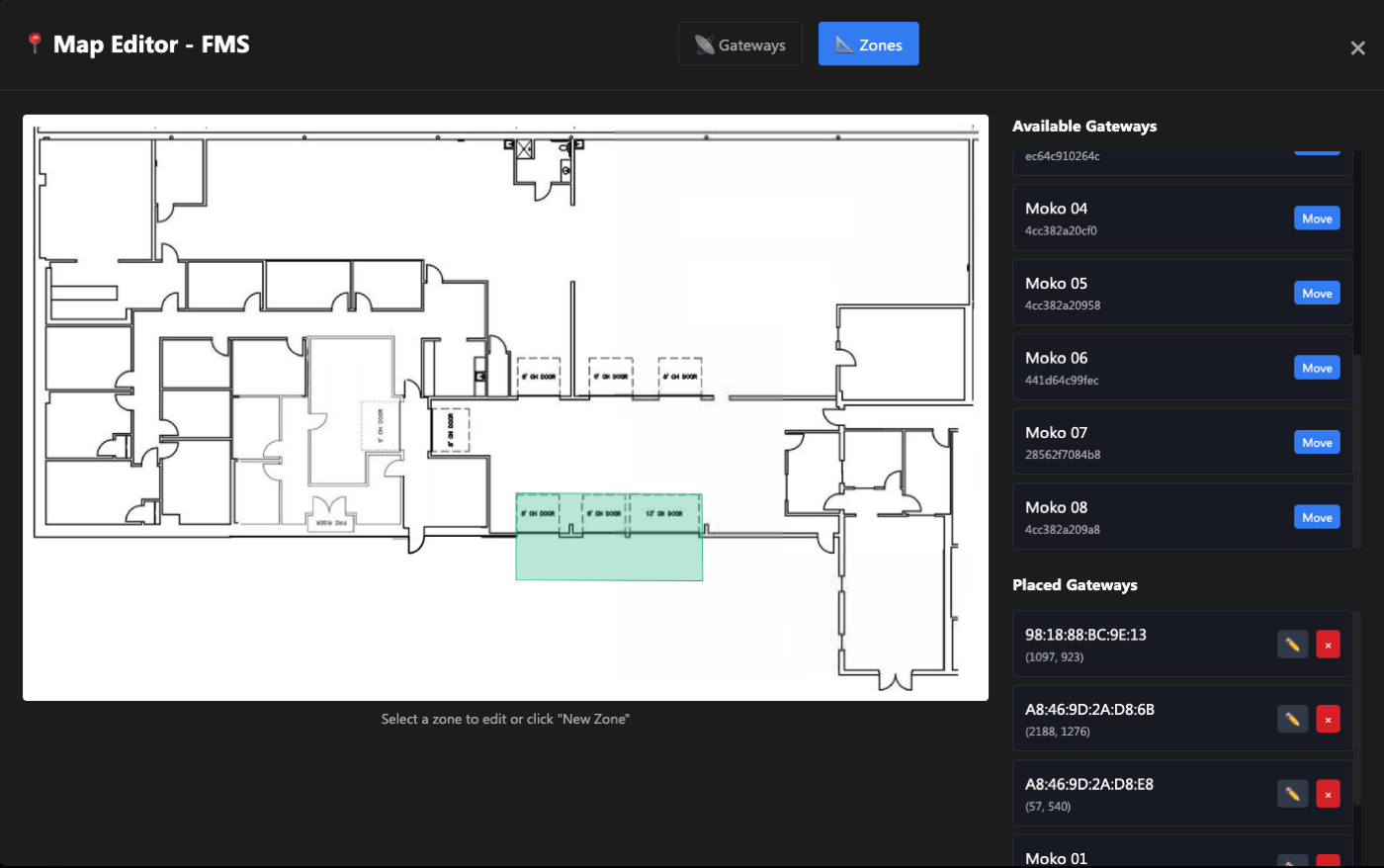
A built-in map editor for placing BLE gateways on a floor plan, with 3-point geo-referencing to align floor plans to real-world GPS coordinates. Operators can update the layout without a developer. Zone boundaries are drawn directly in the interface.
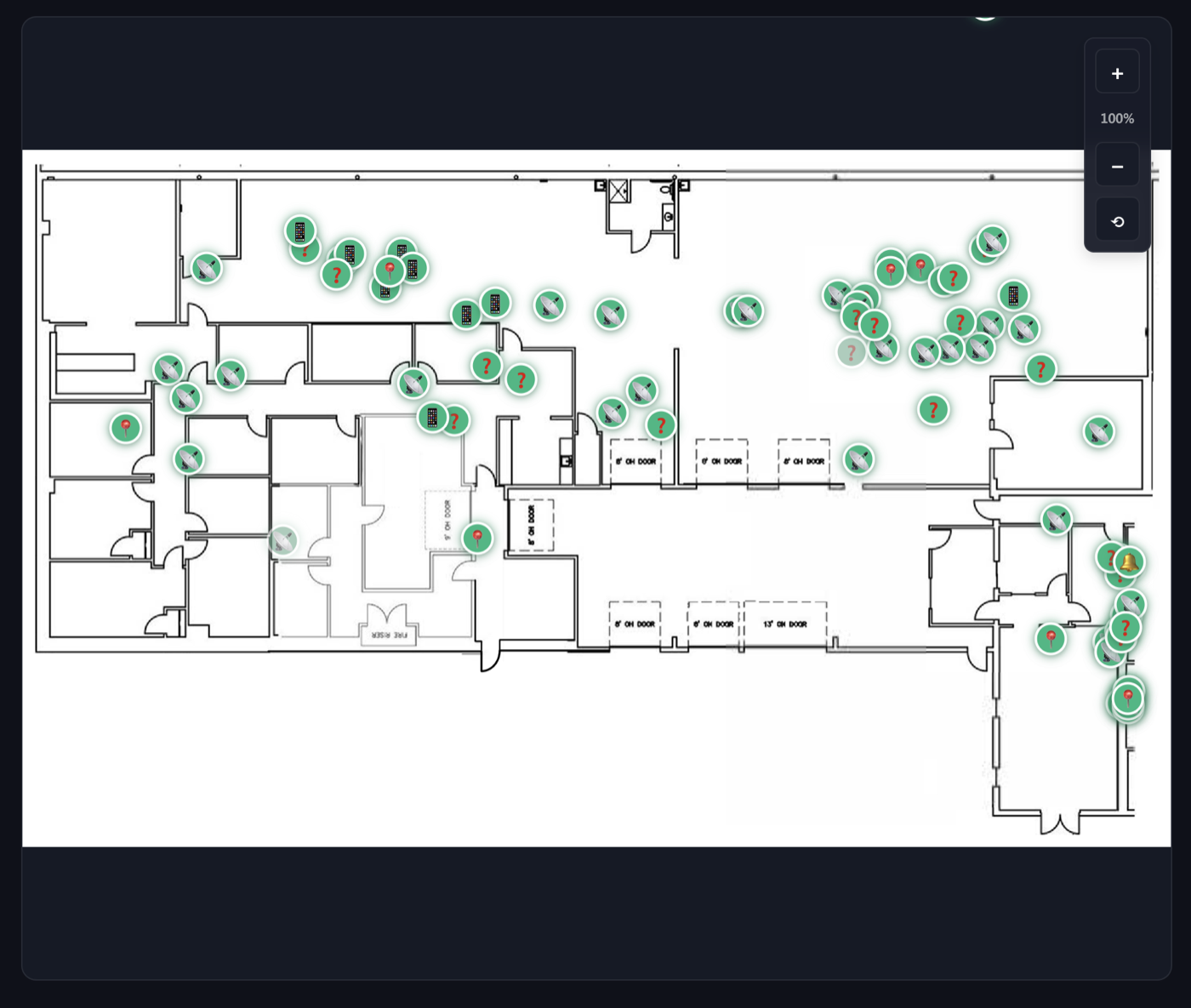
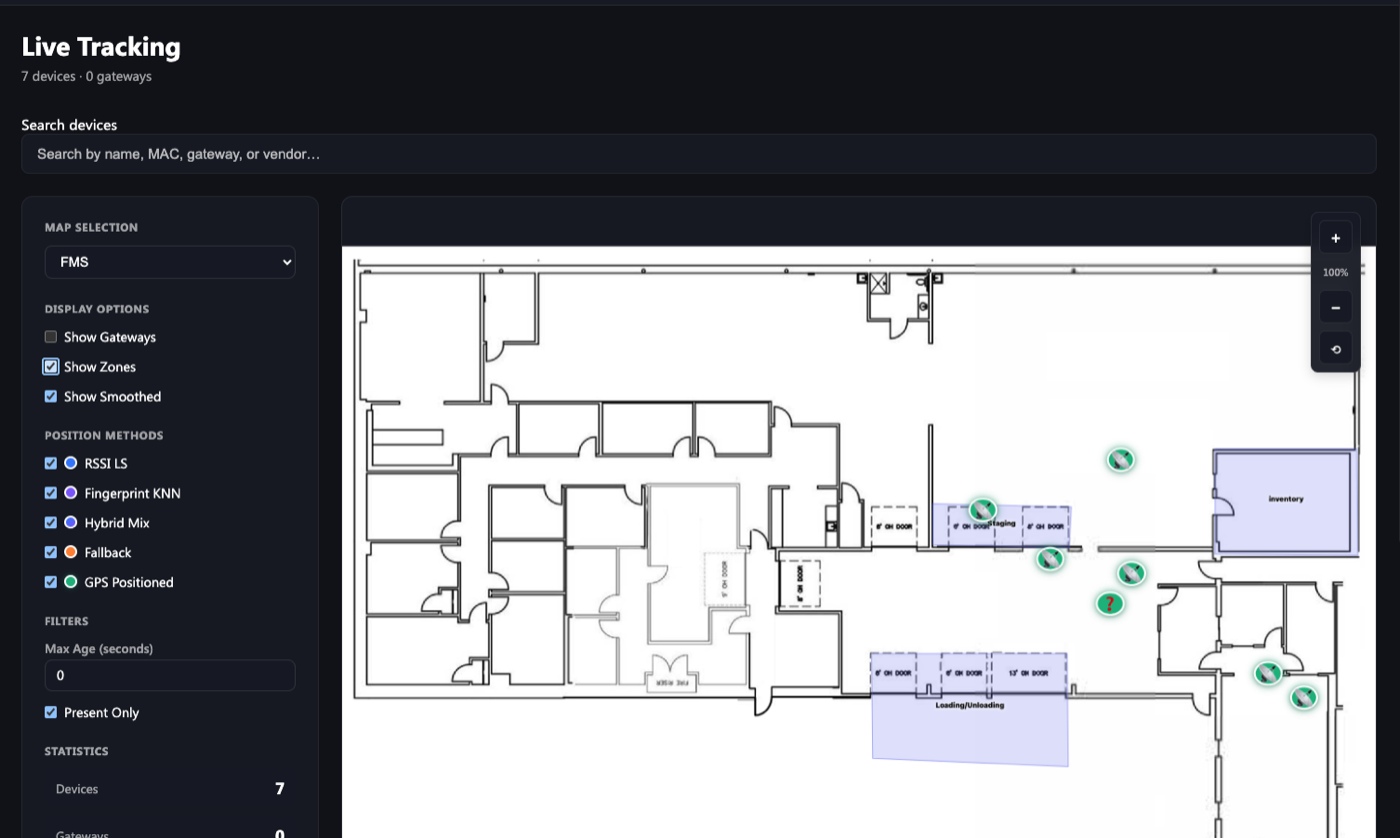
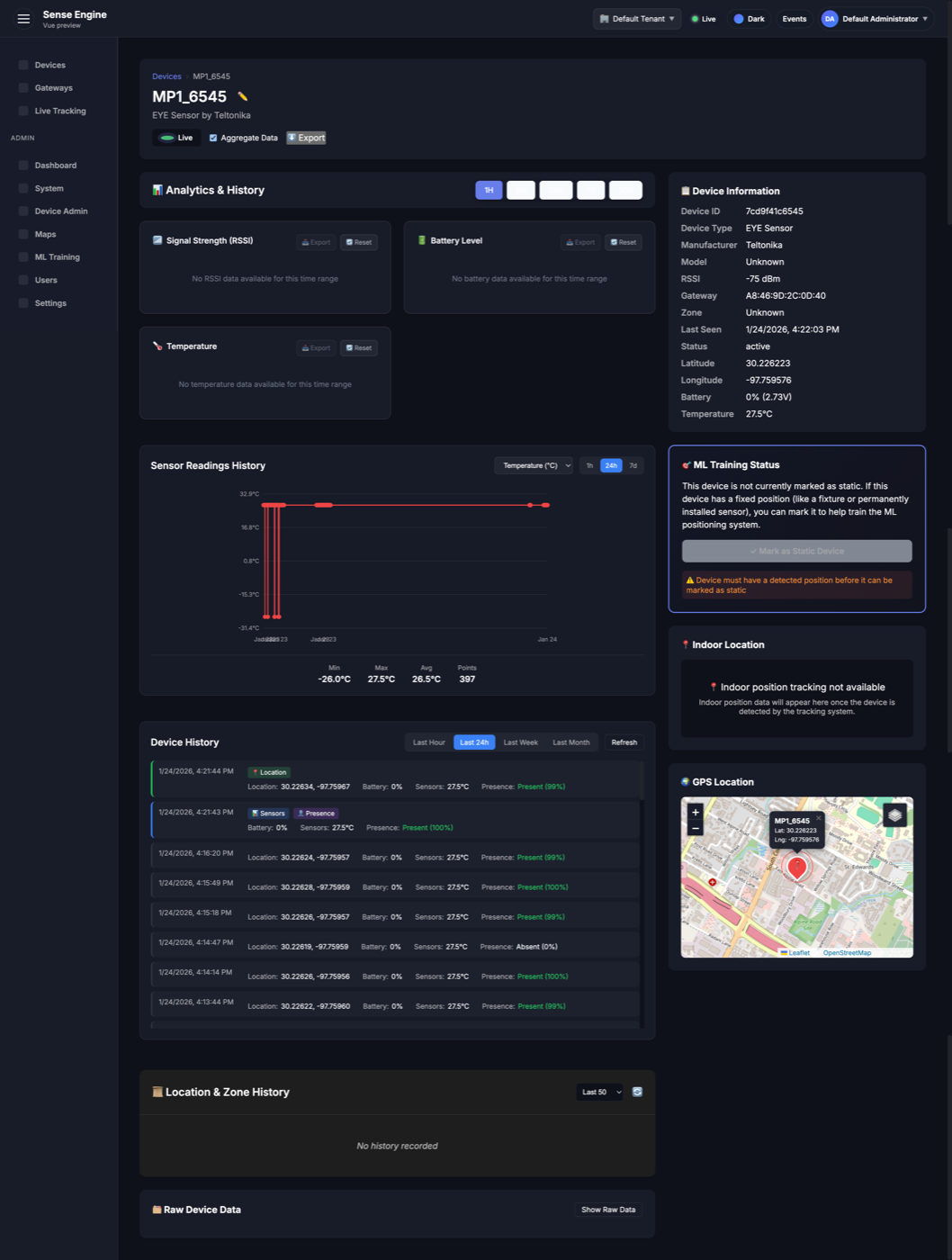
Real-time device positions plotted on the floor plan. Color-coded by status (active, offline, out-of-zone). Device cards show vendor, MAC address, last seen timestamp, positioning method, and signal confidence — without overwhelming a non-technical user.
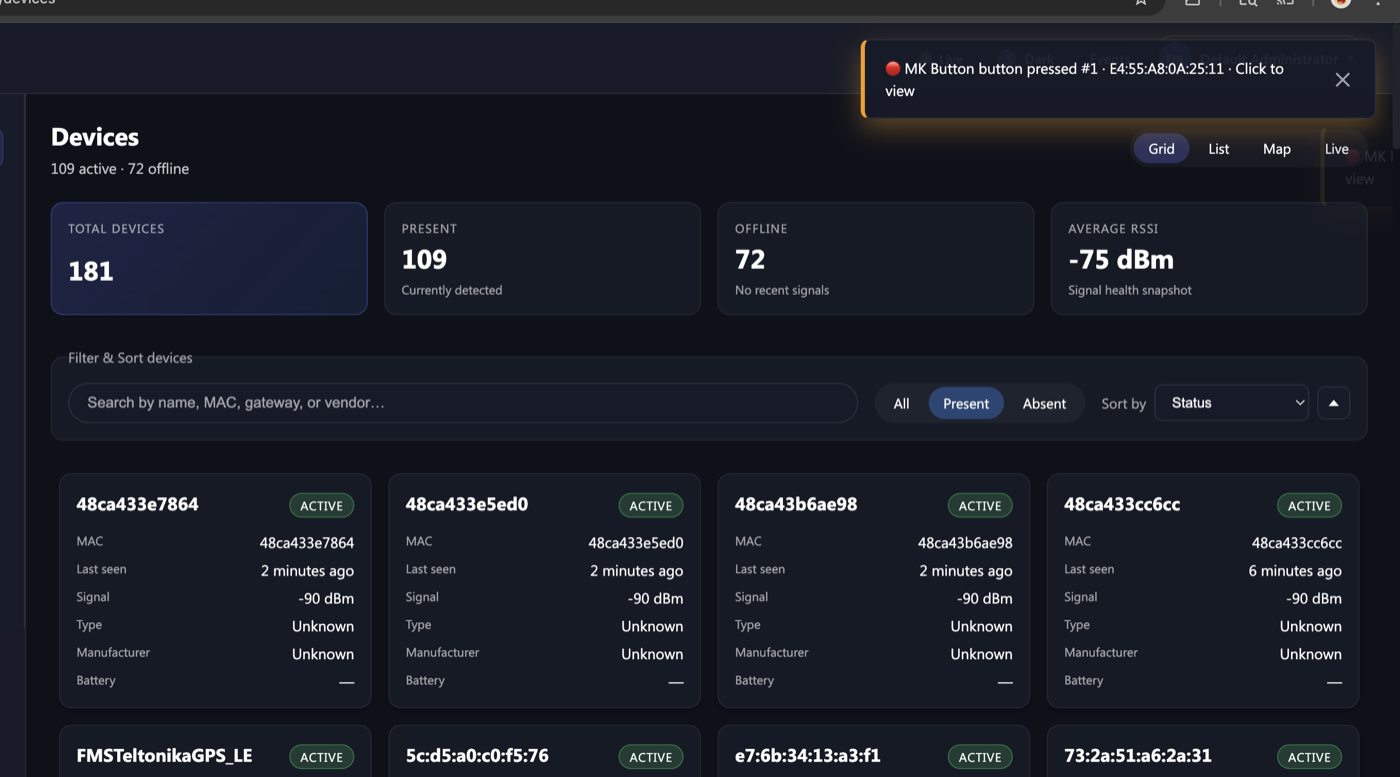
Fleet-level view: total devices, active count, offline count, per-device history and analytics. Operators can see the health of the entire deployment at a glance without needing to know anything about BLE or radio signal propagation.
Configurable zones tied to floor plan geometry. Alerts fire when devices enter, exit, or go offline. Designed so a shift supervisor could configure it without reading documentation.
Fingerprinting-based positioning requires training data. Sense Engine includes a training mode that records signal strength at known reference points, builds the KNN model, and deploys it per-floor without leaving the UI.
Data Flow Sequence
From the moment a BLE device broadcasts a packet, it traverses the physical gateway layer, onto the MQTT message bus, and into the core processing engine. This diagram shows the lifecycle of a single advertisement packet as it is normalized, parsed, and pushed to the UI in real time.
(add RSSI & Gateway MAC) GW->>MQTT: Publish payload to MQTT topic deactivate GW activate MQTT MQTT->>DEC: Deliver message (Subscribed topic) deactivate MQTT activate DEC note right of DEC: Step 4: Normalize format
(extract raw service data) DEC->>PROF: Pass normalized raw data deactivate DEC activate PROF note right of PROF: Step 5: Identify device type
& parse service data
(e.g., temp, battery) PROF->>DB: Save processed device state deactivate PROF activate DB note right of DB: Data persisted deactivate DB par Web UI Update (Asynchronous) note over DB, UI: Step 7: Polling or WebSocket push DB-->>UI: Receive update data (Socket/Poll response) activate UI UI->>UI: Update device status on screen deactivate UI end
Platform
What it looks like.
Technical Deep Dive
Under the hood.
MQTT Message Bus
High-throughput messaging backbone handling thousands of BLE advertisements per second. Ensures decoupling between hardware ingestion and software processing.
Polymorphic Decoding
Decoupled architecture separating gateway protocols from device profiles. Enables "write once, run anywhere" device support across Cisco, Aruba, and ESP32 infrastructure.
Triangulation Logic
Custom algorithms processing RSSI vectors from multiple gateways to estimate X/Y coordinates on the facility floor plan.
Visual Geo-Calibration
Drag-and-drop interface for overlaying floor plans onto real-world maps. Automatically translates pixel coordinates to global latitude/longitude for seamless indoor-outdoor tracking.
System Health & Diagnostics
Automated self-healing pipelines that monitor memory leaks, gateway coverage, and data integrity in real time, ensuring 99.9% system reliability.
Hybrid Positioning (AoA)
Multi-modal tracking engine combining RSSI trilateration for general assets with Angle-of-Arrival solving for sub-meter precision requirements.
Design Challenges
The hard parts.
Unifying three vendor protocols
Cisco Spaces, Juniper Mist, and Mako each return data in different formats with different timing, confidence models, and coordinate systems. Building a single normalized device model that worked for all three — without losing vendor-specific signal quality data — took significant iteration.
Making positioning method choice invisible
Five algorithms with meaningfully different accuracy tradeoffs. Rather than exposing this complexity to operators, the system selects and labels the method per-device automatically. Technical users can override. Everyone else just sees a dot on a map.
Floor plan tools for non-developers
Geo-referencing a floor plan — aligning it to GPS coordinates using 3 reference points — is a non-trivial spatial problem. Building a UI that let a facility manager do it accurately without understanding the math underneath required careful constraint design and immediate visual feedback.
Operator-grade UX on top of radio data
RSSI values, MAC addresses, KNN confidence intervals — none of this means anything to a warehouse supervisor. Every piece of technical data had to be either hidden, translated, or surfaced only when it was actually actionable.
Process
How I actually built it.
I came into this with no RTLS background. The build methodology was deliberately AI-native — not as a shortcut, but as a way to compress the learning curve and move from unknowns to working software faster.
Start in Claude, understand the domain
Before writing a line of code, I used Claude to develop a working understanding of BLE positioning, trilateration, fingerprinting, and the specific vendor APIs. This compressed weeks of documentation reading into targeted, testable knowledge.
Scaffold in Cursor, iterate with real data
The pipeline was scaffolded in Cursor with AI in the loop for the vendor-specific payload decoding. Real device data from the field caught edge cases fast. I built against live data from day one, not mocks.
UX built alongside the data model
The interface was designed as the data model stabilized — not after. Decisions about what to normalize, what to store, and what to surface were driven by what the operator actually needed to see. Design and engineering decisions were inseparable throughout.
Deployed and tested in the field
The sensor network — BLE gateways, Teltonika EYE sensors, LoRaWAN infrastructure on Helium and The Things Network — was deployed across a real facility. The interface was tested by actual operators, not designers. That's what forced the hard UX decisions.
Future-Ready Intelligence
Outcome
What it produced.
40% faster device integration
Adding a new device vendor — a process that previously required custom engineering work per deployment — dropped significantly as the normalization layer matured.
Operator-ready from day one
Non-technical warehouse staff used the system without training. The interface passed its first real-world test without a walkthrough.
Still generating client interest
The PoC wrapped, but the platform didn't. It continues to be actively evaluated and demoed. For a system built from zero by one person in under six months, in a domain I had no prior experience in — that's the result that matters.